
From selected steel.
To a controlled release.
Bring your fabrication exports into one clear workflow. Define the scope, review the notes, run the stages and inspect the package before issue.

From model selection
to an organized issue.
Walk through the controls before your first release. Select a step to see where it belongs.

Start with the members you intend to issue.
In Tekla, select the members or assemblies for this release. Close any active drawing, then open STRIKE RELEASE from the STRIKE ribbon.
Your model selection defines the starting scope. It is not expanded automatically.
One release.
The right deliverables.
Combine the outputs your team needs. This explorer explains the choices; it does not generate or download project files.
Drawings/
Assembly and single-part drawing outputs for review and issue. Available drawings and your export settings control what can be produced.
A place for every part of the release.
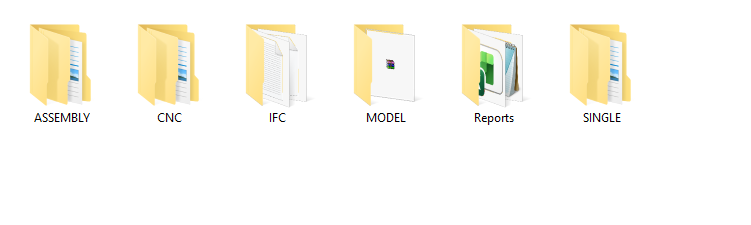
Example release folders: ASSEMBLY and SINGLE for drawing outputs, CNC for machine files, IFC for coordination, MODEL for the saved model archive and Reports for project reports. The folders and files produced depend on your selected outputs.
Buy once.
Use for a lifetime.
A one-time purchase gives you a lifetime license for STRIKE RELEASE.
Clear scope.
Clear expectations.
Does RELEASE fix or renumber my model?
No. It coordinates defined export and packaging steps. It does not automatically fix parts, drawings, numbering or quantities. Use the review notes and your normal checking procedure.
Can I choose only some outputs?
Yes. Enable only the categories required for the issue. Drawings, templates, presets and export components must be available for your Tekla version.
What do IFC and RAR need?
Newer Tekla IFC export needs a reviewed settings XML with a named Property Sets configuration. Optional RAR packaging needs WinRAR Rar.exe. Set these paths in SETTINGS.
Will the model archive include unsaved edits?
The archive copies saved model files. Save the model in Tekla before creating a release if you need recent edits in the archive.
Can I install several Tekla versions at once?
Yes. Check the installed versions you want during setup and verify each editable target path. Matching x64 integration is provided for 2020–2026; verify project outputs in the Tekla version you use.
Where can I get help?
Email info@strike-eng.com or report a bug. Include your RELEASE version, Tekla version and the steps that led to the problem.
Less export repetition.
A clearer path to issue.
One-time purchase. Lifetime license.